

Download Strava – Free Running & Cycling Tracker, Leaderboards, Social Fitness App
Overview
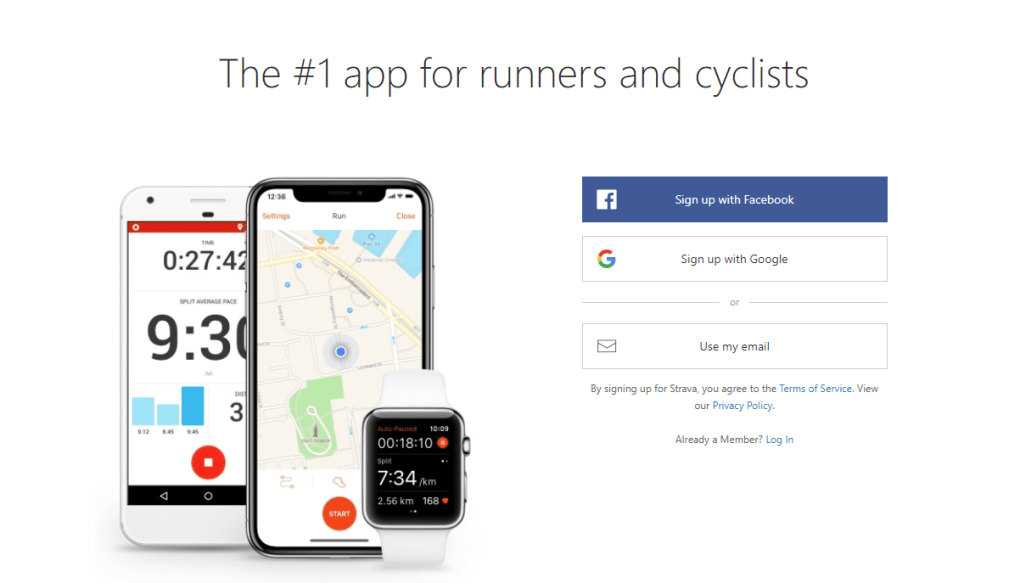
Strava has become the go‑to companion for anyone who enjoys running, cycling, or a mix of both. Whether you are a complete beginner who just wants to log the distance of a morning jog, or an experienced athlete looking to fine‑tune every split, Strava offers a secure, easy‑to‑use platform that turns raw data into meaningful insight. The app automatically captures start and end times, total distance, average speed, elevation gain, and even heart‑rate zones when paired with a compatible sensor.
What truly sets Strava apart from generic fitness trackers is its vibrant community. Every segment you ride or run is shared in real time, allowing you to compare your performance with thousands of other athletes who have tackled the same route. The built‑in leaderboards turn a simple workout into a friendly competition, nudging you to shave seconds off your personal best or aim for a top‑10 finish in your neighbourhood.
In addition, Strava lets you decide whether your activities are private, shared only with friends, or broadcast publicly for anyone to see. This flexibility encourages both privacy‑conscious users and those who love to showcase their achievements on social media. By linking Strava to Facebook, Instagram, or Twitter, you can instantly share photos, videos, and split‑by‑split breakdowns, preserving the excitement of each ride or run.
The app also supports bike component tracking, allowing cyclists to log mileage on individual parts and receive maintenance reminders. In short, Strava is more than a tracker—it is a social fitness ecosystem that motivates, educates, and celebrates every stride and pedal stroke.
Key Features and the Competitive Community
- Automatic activity detection for running, cycling, swimming, and more.
- Real‑time GPS tracking with distance, speed, elevation, and heart‑rate metrics.
- Segment leaderboards that compare your performance against local and global athletes.
- Social feed where you can like, comment, and share activities with friends.
- Integration with popular wearables (Apple Watch, Garmin, Polar, etc.).
- Bike component logging and mileage tracking for individual parts.
- Privacy controls: private, friends‑only, or public activity sharing.
- Direct sharing to Facebook, Instagram, Twitter, and Strava’s own Stories.
- Training plans and challenges designed for all fitness levels.
- In‑app photo and video attachment for visual workout journals.
Beyond the checklist of features, Strava’s community dynamics are what keep users returning day after day. The “Segments” tool divides popular routes into bite‑size challenges, rewarding the fastest times with a “Kudos” badge and a spot on the leaderboard. This gamified approach fuels a natural competitive spirit, prompting athletes to experiment with pacing, gear, and training strategies.
Strava Clubs further enhance camaraderie by grouping users with shared interests—whether it’s a local cycling club, a marathon training group, or a virtual challenge for charity runs. These clubs host events, post training tips, and celebrate milestones together, creating a sense of belonging that transcends the solitary nature of many workouts. Moreover, the app’s analytics dashboard aggregates weekly, monthly, and yearly trends, helping you spot improvement patterns and set realistic goals.
For those who thrive on data, Strava’s Power‑Ups (such as “Heatmap” and “Route Builder”) offer advanced route planning and performance forecasting. All of these capabilities combine to make Strava not only a tracker but also a motivational hub that pushes you to chase personal records and engage with a global community of athletes.
Installation, Usage, Compatibility, Pros & Cons, and Frequently Asked Questions
Installation & Usage Instructions
Getting started with Strava is straightforward. Visit the App Store on iOS or Google Play on Android, search for “Strava,” and tap “Install.” Windows and macOS users can download the desktop version from the official Strava website; the web portal also works seamlessly in modern browsers without any additional software. Once installed, create a free account using an email address or log in with Google or Apple ID.
The first launch prompts you to grant location permissions—essential for accurate GPS tracking. Pair any compatible heart‑rate monitor or bike sensor via Bluetooth or ANT+ in the “Sensors” menu. After setting up your profile, you’re ready to record an activity.
Press the large “Record” button, choose the sport (Run, Ride, Swim, etc.), and start moving. Strava will automatically capture distance, speed, elevation, and heart‑rate data. When you finish, tap “Stop,” add optional notes or photos, and save.
The activity instantly appears in your feed, where friends can give “Kudos,” comment, and share it further. For advanced users, explore “Segments” to test your speed on popular routes, join “Challenges” to earn virtual badges, and use the “Training Log” to review long‑term trends.
Supported Operating Systems
Strava is available on iOS 13 or later, Android 7.0 (Nougat) and newer, Windows 10/11, and macOS 10.15 (Catalina) or later. The app also supports Apple Watch, Wear OS, and most Bluetooth‑enabled fitness devices, ensuring a seamless experience across smartphones, tablets, smartwatches, and desktop browsers.
Pros
- Comprehensive activity tracking with GPS, heart‑rate, and power data.
- Engaging community features like Segments, Clubs, and leaderboards.
- Free tier provides robust functionality; premium subscription adds advanced analytics.
- Cross‑platform sync ensures data is always up‑to‑date.
- Easy integration with popular wearables and social media platforms.
Cons
- Premium subscription required for detailed interval analysis and training plans.
- Battery consumption can be high during long GPS sessions.
- Privacy concerns for users who unintentionally share location data.
- Some advanced features (e.g., Power‑Ups) are only available on iOS.
- Occasional syncing delays when using third‑party devices.
Frequently Asked Questions
Is Strava free or does it require a subscription?
Strava offers a free tier that includes core tracking, basic segment competition, and social sharing. A premium “Strava Summit” subscription unlocks advanced analytics, personalized coaching, and exclusive challenges for a monthly or yearly fee.
Can I use Strava without an internet connection?
Yes. Strava caches GPS data locally while you’re offline. Once you regain internet access, the app automatically syncs the recorded activity to your account.
How does Strava protect my privacy and location data?
Strava provides multiple privacy settings: you can make each activity private, share only with followers, or publish publicly. The app also offers “Hide from map” options for specific routes and a “Privacy Zone” that masks your home location.
Which wearables are compatible with Strava?
Strava works with Apple Watch, Garmin, Polar, Suunto, Wahoo, and most Bluetooth/ANT+ heart‑rate straps, power meters, and cadence sensors. Third‑party apps like Zwift and MyFitnessPal can also sync data to Strava.
Can I export my Strava data for personal analysis?
Yes. Strava provides a CSV export feature for all activities, and you can also connect the platform to services like TrainingPeaks, Runalyze, or Strava’s own API for deeper analysis.
Conclusion – Why You Should Download Strava Today
If you’re looking for a reliable, socially driven fitness tracker that turns ordinary runs and rides into exciting challenges, Strava checks every box. Its free version already delivers accurate GPS tracking, heart‑rate integration, and a vibrant community that keeps you motivated through real‑time leaderboards and club activities. The seamless cross‑platform experience means you can start a workout on your phone, continue on a smartwatch, and review the data later on a desktop—all without missing a beat.
While power users may eventually opt for the paid Summit tier to unlock deeper analytics, the core feature set is more than enough for most athletes seeking to improve performance and stay connected with fellow enthusiasts. By choosing Strava, you invest in a tool that not only records your metrics but also celebrates every milestone, encourages friendly competition, and offers the flexibility to keep your data private or share it proudly. Download Strava now, set your first goal, and join millions of athletes who have turned their daily workouts into a community‑powered adventure.
Strava Review Strava delivers a comprehensive, socially‑focused tracking experience for runners and cyclists. Its free tier provides robust data capture, while the community features such as Segments and Clubs keep users motivated. Battery usage and premium pricing for advanced tools are minor drawbacks, but overall the app stands out as a leading fitness companion.


.png)



